Workflow process visibility
balancing constraints and guidance in automation 2026-04-28 #process #UX
Workflow automation exposes interesting interactions between process design and user experience design, especially when you start with one, and think about the other only later, or not at all. For example, from a business process perspective, an employee in a company might use the following process steps to plan a business trip.
| Step | Actor | Task |
|---|---|---|
| 1 | Employee | Request business trip |
| 2 | Manager | Approve trip |
| 3 | Employee | Plan travel |
| 4 | Travel team | Approve travel |
| 5 | Travel team | Share booking instructions |
| 6 | Employee | Book travel |
You can also represent this in a Business Process Model & Notation (BPMN) diagram, which says the same thing, from left-to-right, and with more clarity about who does what, in each horizontal swim lane:
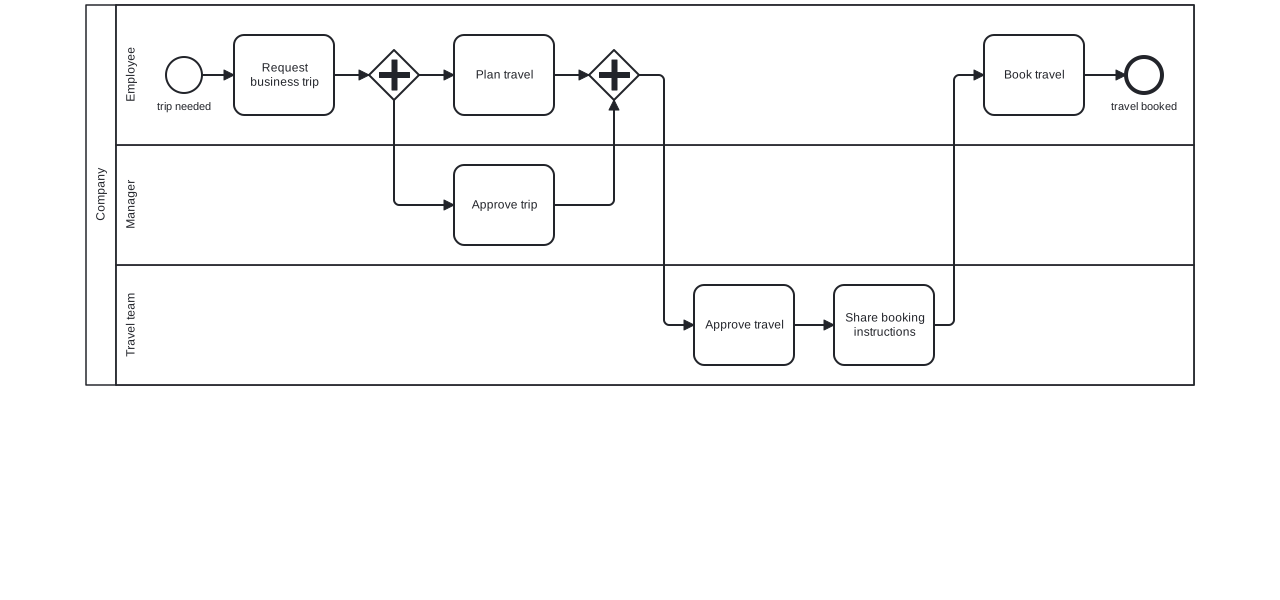
In this model, the manager approves the trip while the employee may plan travel in parallel. However, the travel team approves travel before sharing booking instructions, which specify which type of ticket to book.
Task-based workflows
An automated workflow typically presents the different actors with tasks and forms to complete. Depending on how you automate this, each actor only sees one task at a time, and doesn’t get to appreciate the whole process model at a glance.
When you focus on business process design, someone invariably thinks that the case worker should see the BPMN diagram during execution. This makes sense to people who model processes all day, but you don’t actually implement that in the automation because people booking business trips don’t care about process modelling diagram notations.
The anticipation problem
In practice, workflow automation doesn’t always cleanly implement a process model. For example, I once followed a version of this process that only had partial automation. Booking tickets went slightly wrong because the employee (me) booked the tickets as soon as the travel team approved the travel, but before receiving instructions about how to book tickets.
When following the process for the first time, I booked tickets as soon as I got travel approval, found the booking instructions too late, and booked the wrong type of ticket. It turned out that following the process properly required already knowing what the whole process looks like.
The automation solution
In this example, I booked the wrong type of ticket because I didn’t know which workflow task to complete next. More complete automation prevents completing tasks in the wrong order, by constraining the process steps’ sequence, creating tasks automatically, based on the process model.
The process solution
A process-centric solution might provide the booking instructions before the task to plan travel. That would have prompted me to select the correct ticket type when planning the trip:
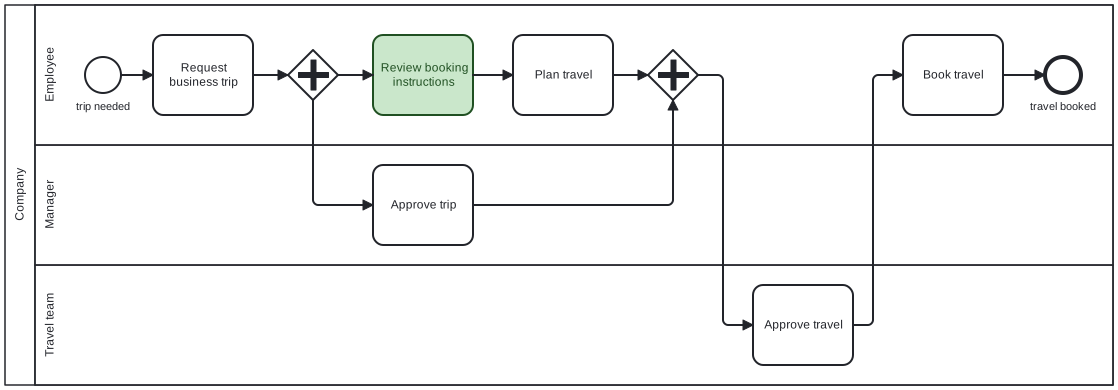
This version of the model moves the highlighted booking instructions task earlier in the process.
The UX solution
Getting a process wrong because I didn’t know all of the steps reminded me of those suggestions to show the BPMN diagram on task execution forms. Showing the BPMN diagram would solve the wrong problem, though, because only process nerds want to read BPMN.
Instead, simplify the process to a linear sequence of milestones, and show those during execution, instead of the detailed steps:
- Request
- Approval
- Booking instructions
- Booking
In general, workflow automation benefits from both constraints and guidance. Good designs avoid too much or too little of either.

